Site Analysis Architecture BIGGEST MISTAKES

4 BIG site analysis architecture MISTAKES I see architecture students make. Avoid making these mistakes when doing architecture site analysis. My site analysis architecture course on Youtube: https://youtu.be/-aFBwHkQNxg

Architecture site analysis might seem like a pointless task, but it is the first step to designing a great architectural project. Let us learn how to do an architecture site analysis by looking at the most common mistakes architecture students make when doing site analysis.

In this video, we’ll look at 4 of the biggest mistakes I see architecture students make when doing architectural site analysis. You’ll also receive tips for improving your site analysis that will help you avoid making these big mistakes that can make or break your architecture projects.

Play Video

Listen to the Podcast

Stream the episode on your favourite podcast platform!

Site Analysis Architecture Biggest Mistakes

The first architecture site analysis mistake I see students make is that their site analysis is done with no clear purpose in mind. There is no clear intention behind their analysis. In order to have a successful site analysis, you need to be decisive as to what you’re trying to show and why. The big mistake is that architecture student’s site analyses are showing too much irrelevant information. For example, your site analysis might be showing which way the wind is coming from. However, if you’re not doing anything with that information, then what’s the point in showing it? Unless you’re making architectural design moves from your site analysis, there is no point showing it. If you’re showing the wind direction and strength, make sure your architectural design responds to that. Demonstrate to the client or your architecture teacher that you’ve understood the limitation, that the wind is coming from a certain direction at a certain speed, and propose an architectural solution to that constraint.

Don’t show a wind rose for the sake of showing a wind rose. Have a clear intention behind what you’re showing in your site analysis and use that information to make your initial design site moves.

  1. Need to have a purpose for what you’re showing.
  2. Your site analysis is showing irrelevant information
  3. If you’re showing which direction the wind is coming from, also show how this influences your design, have you used that information to orient your building or add windows on certain facades?
  4. Think, if you’re coming to a client with a site analysis with all this information, they’re going to be sitting there thinking “why have I paid x amount of money to be told something I already know”.
  5. People show where noise is coming from, how do you respond to that? Do you put audial barriers up in that direction? Have you zoned your quiet spaces away from the noise?
  6. Only show what is necessary and indicate how you’ve used that to create design moves.

The second architecture site analysis mistake I see students get caught up doing, is that they are not graphically communicating their site analysis in a thoughtful manner. Site analysis may seem like a pointless task that you do just to “tick the box”. Because of this, students often research general site information, overlay it on their site plan and call it a “site analysis”, when really all they’ve done is overlay some information from google, something a 7-year-old kid could do.

Make sure you’re taking only what’s necessary for your site analysis, as explained above, and organise this information thoughtfully and concisely. Utilise line weights and opacity to create a hierarchy in your architecture site analysis. Consider what is important in your analysis and use line weights and opacity to give that priority. Hierarchy is key for any architectural drawing, not just a site analysis. Use a simple colour scheme, often 2-3 colours is suffice, and use different shades or opacities of these colours to create depth in your analysis. Experiment with diagrams, sketches and drawings to show what you’re thinking and have researched, rather than using blocks of text.

  1. Choose a simple colour scheme.
  2. Use diagrams, sketches and drawings
  3. You might have great information, but it can often get jumbled and disorganised if you let it. Choose 2-3 colours and consider the hierarchy of what you’re trying to show based on its importance. Use headings and minimal text.

The third architecture site analysis mistake I see architecture students make is that your site analysis is being done as a preliminary task and shortly after being completed is being forgotten. Your site analysis can give you so much information to work with, but often we do it as a task that “has to be done” to tick the boxes and forget about it. Let the site analysis carry through the entire design phase, not just being a preliminary task to do before designing. Let the site analysis influence your design.

The final mistake I see architecture students make when creating site analyses is that they limit their site analysis to a site plan.

Lots can be shown in section, plans, perspective, sketches, diagrams, and other modes of communication such as animation or temporal media. Again, consider what you’re showing and pick the best mode of communication. You might notice which way the wind is coming from, then sketch a passive design sketch showing how your design will utilise it. A site plan can be effective for a site analysis, but there are many other modes of communication that can tell a different story.

Thanks for watching my site analysis architecture video. If you’d like to check out some of my online courses to learn architecture, feel free to check out my website! https://successfularchistudent.com/courses-for-architecture-students/

Resources Mentioned

Learn Architecture with my Online Courses: https://successfularchistudent.com/courses-for-architecture-students/

Further Watching

Other Resources:

FIND ME ON SOCIAL!

Create Better Architecture Concepts

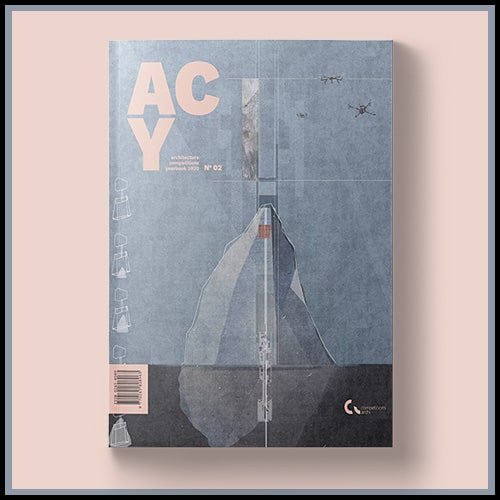
5 Tips to Create Better Architecture Concepts from winning competition entries in the Architecture Competitions Yearbook for 2020

Watch the full book review and further breakdown of winning projects: https://youtu.be/fluFhqmoE4k

Buy a copy of the book for yourself: https://yearbook.archi/?wpam_id=3

Play Video

Listen to the Podcast

Stream the episode on your favourite podcast platform!

Create Better Architecture Concepts

Timestamps:

0:21 Keep it simple.

3:24 Use diagrams and illustrations

4:43 Ideas and reasoning before visualisation

6:03 Tell a story

8:08 Put in more effort

9:50 Bonus tip

10:11 About the book

  1. Keep your architecture concepts simple.

You can have a complex architectural project, but don’t overcomplicate your architecture concept. If you cannot explain your architectural ideas and concept so that your audience can understand it, it’s pointless. You architecture concept needs clarity and simplicity from which your architectural design decisions can branch off of. A word my teacher told me in my second year of architecture school was ‘parsimonious’. This words means ‘RESTRAINED’, ‘SPARING’ OR ‘FRUGAL’. If you architecture concept is parsimonious, it has restraint to the complexity of it. You are being sparing with your ideas and not letting it get too complicated. Keep your architecture concepts simple.


  1. Use diagrams and illustrations to demonstrate your architecture concepts in words.

Even really simple drawings. By illustrating your architectural ideas and concepts into quick sketches, diagrams and drawings, it allows you to further simplify the complexity of your concept. Drawing diagrams and sketches enables you to articulate your own thoughts and architectural ideas from words to drawings (the aim of an architect) and makes it easier for your audience to understand it. Even the sketchiest of sketches should be used as diagrams or drawings to convey your architecture concept. Parsimonious articulation of your ideas is the key for a strong architecture concept.


  1. Set the foundations of your concept first before visualising them in final form.

Your ideas and reasoning behind your projects come first. The architectural concept phase is a phase that once you finish and move on, you cannot reverse. Especially in the real world, once you finish the concept, the further you bury into documenting that concept, the harder it is to return to those original ideas and change them and the more costly to the client doing so would be. All architectural projects require a strong foundational concept before progressing. Spend the time to develop an architecture concept that works.


  1. Tell a story through your articulation of your architecture concept.

Share a story of how you got your project to where it is. Get those you’re trying to convince (the teacher, client) to become emotionally invested in your architectural ideas. By telling a story through your architecture concept, you can bring the client/teacher along a journey and get them on the same page as you. A lot of students go straight to explaining their ideas in functional terms. Consider telling a narrative through your architecture to explain your concept.


  1. Put in more effort to your architectural concepts.

This one seems silly. Put in more effort. However, that is the key theme I found across all the successful projects with strong architecture concepts. More effort produces better results. What I’ve noticed over my last 4 years studying architecture is that it is difficult to put effort into something you are not passionate about or invested in. To get invested in your architecture projects – your concepts – you need to make it yours. Take advice from others, look at inspiration from pinterest or Instagram. But, at the end of the day, your architecture concepts need to run on what fires you up. Your passion will result in more effort and time invested in your projects, and that shows. The best bit is that your passion rubs off on others. Teachers in architecture school aren’t looking for talent or skill, they’re looking for passion and effort. The students who have put in the work and have pushed themselves are the ones who get the best grades.

Resources Mentioned

Watch the full book review and further breakdown of winning projects: https://youtu.be/fluFhqmoE4k

Buy a copy of the book for yourself: https://yearbook.archi/?wpam_id=3

Further Watching

Other Resources:

The Challenges of Architecture

Architecture is a challenging profession to work in. The challenges of architecture are diverse, but they do not necessarily make it a bad profession.

I asked 15 architects what their biggest challenges are and got 15 completely different responses. Here are 14 challenges you need to prepare yourself for if you are thinking of becoming an architect.

Play Video

Listen to the Podcast

Stream the episode on your favourite podcast platform!

14 Challenges You Will Face as an Architect / Architecture Student

  1. Finding a balance.
  2. Some projects just suck.
  3. Beginners do not know everything.
  4. Keeping the clients happy.
  5. The volume of admin work.
  6. Finding work as a graduate
  7. Cannot be biased – even outside of your work.
  8. It does not give you the skills to run a business.
  9. Unrealistic deadlines.
  10. Communication – you can have the best ideas but if you cannot express them, they’re worthless.
  11. Difference between school and practice
  12. It takes a lot.
  13. There is an enormous responsibility.
  14. Deadlines. Again.

This video will give you an insight into the challenges of architecture and offer advice for making the most of the opportunities they give you.

Resources Mentioned

Further Watching

Other Resources:

Architecture Site Analysis

Architecture site analysis might seem like a pointless task, but it is the first step to designing a great architectural project. Let us learn how to do an architecture site analysis.


Play Video

Architecture Site Analysis – The Site Analysis Course for Beginners

Architecture site analysis might seem like a pointless task, but it is the first step to designing a great architectural project. Let us learn how to do an architecture site analysis.


You know that site analysis is important for your architecture project. So, you go to site with some friends. You take a sketchbook, your laptop and a few other tools, ready to analyse the site.

You arrive. Now what?

You stand around and chat for an hour then go home with a simple observation of the site. You get on google maps, draw the sun path, guess which way the wind was coming from and call it a day.

That is the extent of site analysis for a lot of us. Architecture site analysis might seem like a pointless task we do just to “tick the box”. But, as I have just discovered from my studio 7 project, it’s not only really helpful, but essential and the first step to building up a great sketch design and architecture project. If you complete a site analysis just to “tick the box” – you are setting yourself up for failure and leaving out a lot of key details that will help assist you in progressing your design forward.


My name is Kyle. I am going to show you how to do a complete architecture site analysis that will form the foundation of your projects.

As mentioned, I have just completed a site analysis for my studio 7 project. This was a task set out for the course, the first assessment being a site analysis. I think the assessment was structured extremely well. It was structured linearly, as in a step-by-step process that you can replicate for any project.

The first step of site analysis is about finding the limitations to the site, for example, the sun that goes in a set direction. These are the constraints. The things you cannot change that you need to work around or work with. That is really important. Because after you find all the limitations and constraints, the next step is finding how you can take some of those aspects and use them to initiate some design ideas. We call these the “site moves”.

The site moves are built upon from the initial site analysis. You are taking 2-3 key limitations about the site and using them to come up with small design ideas that you can implement to the site.

The third step to site analysis is spatially organising the programs set out in the brief. What are the spaces required by the client? How do they connect to each other physically, visually and audibly? This step involves diagramming the programs in relation to each other using a mind map. To take it a step further, you can overlay this map over the top of your site in a plan drawing. This will help you understand where the different programs will go in relation to each other, but on the actual site.

The final step to site analysis is finding precedents that can influence your design. This is similar to the site moves step. It is not just an inspiration board or searching on pinterest. Find built projects that have previously been built and take as many key ideas you can away from them. Draw them out yourself and consider you can use them in your project. This might be materials, spatial strategies, little moments in the building that you like.

And there you have it. That’s how you successfully start an architecture project by doing a complete site analysis.

Good luck!

Resources Mentioned

Further Watching

Other Resources:

What I learnt from interviewing 15 architects, interior architects and graduates.

I interviewed 15 architects and interior architects. Some were in their last years of architecture school, others had 30+ years of experience. I learnt a lot.

I interviewed a lot of smart people who had incredible experiences and accomplishments, regrets, and advice. Here is what I learnt from interviewing 15 architects for the documentary “Behind Closed Doors – The Life of an Architect”.


Play Video

Listen to the Podcast

Stream the episode on your favourite podcast platform!

What I learnt from 15 architects

You do not always work on the things you want. But you have to own them. Show up to those things and do them the best you can. It is not until you can prove that the menial tasks your given are done well that you are given something with my responsibility.


Your education will not give you the skills you need for practice. And that is fine. What it will give you are the skills necessary to progress constantly in your career. It teaches you methods of problem solving and learning that will allow you to mould yourself and adapt to whatever path you choose to go down next. Gabrielle says architects are “jack of all trades, master of none.” That is right, you cannot be a master at everything. And you are going to have to deal with many different aspects. The ability to quickly pick up new skills, to solve problems when a new project gets put in front of you, how do you move forward? To be able to think problems through independently and think for yourself, that is what architecture school prepares you for.


Kyrstyan says you need to be passionate. Unfortunately, that does not come straight away. It is developed over time through exploring new things. We often go through ups and downs of motivation, as Marianno says, “you have your good days and bad days. But on the whole…” – by trying new things you’ll find something that lights you up.


Make the most out of your peers and teachers. This shifted my perspective quite a lot. I am very much about efficiency and getting shit done, and often skip classes if I feel there’s nothing to gain from it, but this semester I’ve noticed that just by sitting down and listening to your peers, talking with others, you learn so much and gain so much from doing so. It is not wasted time investing in relationships with people. That is what I’ve come to learn.


Nelize says she wanted to quit in her 2nd year of uni. I get messages like this daily – “I want to quit, it’s not for me.” We struggle in uncomfortable situations. If we do not have clear instructions, or we are not sure how to do something- it can cause doubt and depression. She says, she now knows how to use the software, she now flourishes in her work at Northern Edge Studio – she rocks up to work excited because she initially put herself in the uncomfortable situation of trying something new. Constantly push yourself outside your comfort zone, don’t rely on others to push you and experiment – have fun. Do not take it so seriously. Revise things often. Come back to old ideas and keep going.


Your education is what you make of it. You only get out as much as you put in. Take ownership of what you do. Own it. If you do not do so well at a project, we like to shift that blame on others. I still do this to this day, “the teachers were clueless, I got too distracted by my friends, I couldn’t work from home…” take the blame and move forward. It is the best piece of advice.


What was prevalent across the more experienced architects, they wish they had a wider range of experience in earlier years. Taking opportunities to go on study trips, constructions tours, networking events, working at different practices, trying their own thing. Do what you are really passionate about and not care about the salary.

Resources Mentioned

Further Watching

Other Resources:

Winning Architecture Competition Submissions: How They Won

Grab a coffee, we’re diving into the winning architecture competition submissions of 2020 to find out the secret ingredients for successful projects.


Play Video

Winning Architecture Competition Submissions: How They Won

Buy the Architecture Competitions Yearbook for 2020 (Limited Stock):

https://yearbook.archi/?wpam_id=3

Do you ever look at other students work and think “how the f***?”

Today, I received the key to getting better at architecture. A book containing the best architecture competition submissions of 2020 with explanations of how they won and extra interviews with incredible architects who are absolutely killing it. Let us explore what these guys did to create projects that won global competitions. They have to be doing something right. Let us find out what that is. What’s the secret ingredient to successful architecture projects?

From the Author:

“Each project you do is important – it’s a step forward, an additional element that makes you a better designer. Even the smallest project can contain a big idea. But how to make sure that your projects are good? How to guarantee that there is value behind them? How to deliver a project that will grab the jury’s attention and win recognition? What are the secrets behind winning submissions? Well, we will answer all those questions with this book.

The second issue of ACY showcases 10 of the most inspiring and interesting architectural competitions that took part in 2020. Along with them, we are presenting over 30 complete projects with project boards and descriptions. The main focus of this edition is to understand the design process behind all awarded submissions. That’s why we have asked all 10 winners presented in this book a simple question: “What made you win?”. We share stories where they describe the process step by step and give advice that will allow you to understand their ‘secret formula’ better.”

  • What’s the secret behind awarded submissions?
  • How to make your presentation board stand out?
  • How to create an innovative solution to the given problem?
  • What benefits come from participating in the architecture competitions?
  • How to grab the attention of a jury panel?
  • What makes a good project?

Here’s a sneak peak inside the Architecture Competitions Yearbook for 2020:

On over 200 pages you will find:

  • 3 interviews (including Nathalie de Vries from MVRDV) where our guests highlight the importance and meaning of participating in architectural competition and its influence on the development of architecture
  • 10 of the most interesting architectural competitions of 2020
  • 10 detailed case studies of the winning projects, where authors share the whole process of designing, with unique tips to implement in your projects
  • Over 30 awarded projects – complete project boards with author’s descriptions to better understand the idea behind them
  • Tons of inspirations and advise on how to take your design to the next level

Here’s what others have said about the book:

“(…) again thank you for the book. We found it very inspiring. It sets the bar high and challenges you to improve…”

Wojciech Motylski @wojciech.motylski

I really like the full bleed pages of graphics and renders – very inspiring. I personally love visual books, I could stare at them forever! It was also good to get an idea of what the winning entries have in common. They showed the design ideas of projects for competitions but I could even implement some of the things i saw for general portfolio work and how to make projects stand out more for presentations.

Ruhel Ahmed @archiruh

The book is the architecture competitions yearbook for 2020, it’s the second volume of the publication. Last year, we reviewed the 2019 volume and actually gave away a few copies on this channel as well as over on Instagram. We’re going to be doing that again this year – if you want to win a copy of this book, stick around because a bit later ill explain how you can go about having a copy sent to your door for free.

Well, grab yourself some thinking juice or a snack, we’re going to dig deep into this book and extract the best bits for you to evolve your own projects into potential competition winners.

Resources Mentioned

Further Watching

Other Resources:

How to Use a Scale Ruler

How to use a scale ruler to read and draw architecture and engineering scaled drawings.

If you’re studying architecture, engineering or a similar course, you’ll have to know how to read scale drawings, and draw them yourself – in most cases, using a scale ruler.

Play Video

How to Use a Scale Ruler for architecture and engineering drawings

In my first year of architecture school I was introduced to working in scale. As a refresher, from the “how to read and draw a scale floor plan video”, drawing to scale is drawing an accurate representation of something, usually in a shrunken version of itself.


Scale rulers come in different shapes and sizes, but they all do the same thing.

They come with different scales because you often need to represent things at different scales. For example, a cabinet doesn’t need to be shrunken as much as a whole house would need to be to fit on a page.


The common scales you’ll see on scale rulers are 1:1, 1:5, 1:10, 1:20, 1:50, 1:100, 1:200 and 1:500

Notice how these are all easy numbers to remember. This is really important.


You won’t see any scale rulers or professional architects or engineering drawings at random scales such as 1:7, 1:52 or 1:300.

I see quite a lot of students make their drawings in random scales to fit them on their poster or drawing set. Don’t do that. It makes life difficult.


The reason why these are at the scales they are, is because they are easily divisible. They are easy and fun to work with. The best way to learn how to use a scale ruler is by using one. So, let’s have a look at how we do that.


I’m going to take a stab and say you’ve been given the task to draw a drawing at a certain scale. Let’s say your teacher has asked you to draw a floor plan at a scale of 1:100. – this is quite a typical scale for a floor plan, elevation or section.


So, what does this actually mean? Your teacher wants you to draw your design 100 times smaller than what it would be in real life.


So, drawing a wall that’s 300mm thick, in a 1:100 drawing, would be 100 times smaller than that. 300/100 is 3. So, the 300mm wall would be drawn 3mm wide on paper in a 1:100 drawing.


So, the wall is 3mm wide on paper. Let’s also say it got a length of 7m long. Do you have to divide every single measurement by 100 in order to draw this drawing? The answer is no that would suck if you had to calculate every dimension. In fact, the solution is your scale ruler.


If we navigate to our 1:100 scale, it will actually tell us what 7m would look like on paper.

If you want to draw a 300mm thick wall at 7mm long, all you need to do is follow your scale ruler.


In this video you’ll learn how to use a scale ruler for architecture and engineering.

Resources Mentioned

Further Watching

Other Resources:

How to Develop Successful Architecture Concepts in Architecture School

Concepts are the key themes and ideas underpinning every studio project in architecture school. This is how you develop a successful concept.

Concepts are what drive your architecture projects forward. Without a concept, your project has no legs. With a concept, you can get passionate for your project to take it to higher levels.


Play Video

Listen to the Podcast

Stream the episode on your favourite podcast platform!

How to Develop Successful Architecture Concepts in Architecture School

Architecture concepts are what drive your projects forward. Your concept is the key item underpinning every studio project in architecture school and plays an important role in determining whether your project is successful or not. Without


Concepts are what drive your architecture projects forward. They are the fundamental items underpinned to every studio project in architecture school and play an important role in determining if your architecture project is successful or not. Without a concept, your project has no legs. With a concept, you can get passionate for your project to take it to much higher levels.


For studio 4 I was given a brief to design something having a key focus on the design concept. There was little focus on budget, structure, sustainability, detailing. Rather, we were able to immerse ourselves in the purity of architectural creativity. I’ll be going over my studio 4 project which has been my most successful concept and project to date to explain how you can develop successful architecture concepts in architecture school. Stick around to the end of this video to hear my best advice for developing concepts and to also see some examples of incredible architectural concepts.


There is a lot that goes into an architecture concept. And I’m going to go over an exact strategy plan for you to follow to come up with your own successful concepts, But if there was one thing I’d like for you to take away from this video, it’s this – the most important thing to know is that a concept takes time to develop. It’s not something you can pump out in 20 minutes. It’s not a word you pick from the air, or a diagram you sketched, it’s an idea. It’s a multitude of ideas. It is not something that is chosen but formed and developed over time. Think of the forming of the Earth. The mountains and valleys weren’t just placed there, scientifically speaking, but moulded from external elements, volcanic eruptions, wind, water, temperature, climate, natural events that formed the rocks over millions of years.

Your architecture concept is an idea that is moulded over time from external elements. Just by working on your project and spending time on it. It needs time to stew and ferment.

This doesn’t just mean waiting patiently at your desk. Here’s the process for stewing up the perfect concept.


Step 1 – distilling the brief.

All studio projects begin with the briefing. In architecture school, you’re given a brief. A document stating what is being asked of you for this project. In real life, you’ll need to talk with the client to understand what it is they want so that you can form this brief yourself.

This is fundamentally where projects rise, and other projects fall. It’s overlooked how important understanding the brief is. I would spend a whole day underlining, highlighting and trying to debunk the brief. Understand what is being asked of you. This is where your first ideas will start to cook up. Really, the key for step 1 is to sum up the brief in your own words. Don’t underestimate the power of who, what, where why, how. List everything you can.

You want to try and distil the brief down to a couple of key words. Through a filtration process you want to filter out the unimportant and focus on the key information.

A lot of people become so overwhelmed with their projects that they start to get stuck. They stagnate and lose motivation. This is often caused by looking at the brief as this huge document, and the brief ends up becoming a wall from stopping you moving forward.

You need to distil it down to a couple of important key words. That filtration process happens by reading it over and over, understanding it by highlighting keywords, underlining important information and rewriting it in your own words. Formulate a brief of your own that is succinct and easy to digest. Find the parts that fire you up and go with that. We’re looking for 2-3 key words that will drive your project forward


Step 2 – visualising the brief diagrammatically

Once you’ve filtered the brief into 2-3 key words, you want to visualise this diagrammatically.

Take out your pencil and an abundance of sketch paper and write these key words. Begin drawing what you think these key words look like. Don’t hold back. Draw anything that comes to mind and don’t throw it out. For my studio 4 project I began by layering a3 sheets. I drew all over them, drew over other drawings and scribbled all over it. When the page was full, I’d layer another sheet on top and continue. I ended up with a 100-page folio showing my concept development through sketch designs to more detailed plans and sections. This wasn’t apart of the project, but it was something extra I handed up with my project that was just something cool to look at to see my process. Unfortunately, my professor wanted to keep my project as an example for future years so I don’t have that anymore, but I encourage you to do this.

The key part of step 2 – Draw a lot and don’t throw out any of the old work.

What this step is telling us is that a concept isn’t necessarily just 1 thing or 1 drawing. It is a multitude of different ideas that ultimately form your “concept”. It is a process.


Step 3 – stay inspired

As you’re sketching your 3 key words into diagrammatic forms, keep yourself inspired. Get on google images or Pinterest and search for projects or art or other designs that follow a similar theme. How do these key ideas look architecturally? Just like keeping all my sketch drawings, I create a folder with all my inspiring projects. I keep this inspiration folder and add to it over the course of my project. Having precedents is key.

It’s great to have lots of sketches and keywords, but there comes a time where you need to start creating architecture. If you find that you’re starting to stagnate or get stuck in one place, move on. Constantly think about how you can push the process forward, there’s always opportunities to come back to what you’ve previously worked on.


Step 4 – consider the site

Neighbouring buildings, solar orientation, prevailing winds and so forth. All buildings should be designed with passive principles in mind. I always have a look in google maps and google earth. I’ll float around the site and take screenshots. I’ll look at the site slope and important features. I’ll add these to a folder and refer back to it.


Step 5 – revision


Each step of developing a successful concept should be revisited over the course of your project. They happen in order but are constantly referred back to and revised as your ideas progress. Don’t be afraid to return to step 1. Don’t be afraid to explore a new key word or a new theme for your project. In fact, your first idea is never going to be your final idea. Developing a concept is a process that happens over time through filtering, refinement. It’s a journey of experimentation.

Resources Mentioned

Further Watching

Other Resources:

Top 4 Websites for FREE Cutout People

Architecture Visualisation

Here’s 4 of the best websites to download free cutout people for your architecture projects. This is a list of websites that have a lot of free cutout people in png, dwg and ai format.

Play Video

Top 4 Websites for FREE Cutout People

Finding the right cutout people for your architecture projects is hard and often takes a long time.


  1. https://pimpmydrawing.com/
  2. https://skalgubbar.se/
  3. https://www.mrcutout.com/
  4. https://www.viz-people.com/free-stuff/


It’s as simple as going to these sites and downloading the right cutout people for your architecture projects. Though, so often I spend hours of my project work just looking through the internet and my material library to find the perfect cutout person.

These sites will help you quickly and easily find the right cutout people for your project, for free. I’m going to share with you my 4 best sites for cutout people and if you stick around I’ll let you know how I organise all my people in a material library so that you don’t get carried away spending hours looking for people. Organisation is key as an architecture student.


1: Pimp My Drawing

Can download them as illustrator or dwg files. These are all black and white cad and vector drawings so you can scale them as big or small as you’d like without ruining quality.

Also trees and cars available.

Some things cost money but lots of free ones.


2: Skalgubbar

Skal gubbar is free, you can download single pngs in high quality and big resoltuon. Honestly so many.


3: Mr Cutout

Can only download up to 2.5mb of cutouts every day. If you open up an incognito window you can keep downloading as many as you want, or you can support the people who created it and pay them.


4: Viz People

This is a huge pack of 2d realistic people for free. They come as photoshop files though so I’ve turned them all into PNGs.

So rather than going to download these files every time you do a project, I like to download them once and then organise them into my material library.


I’ve organised all my people into categories which make it super easy to go through and find what im looking for.

Every time I download a new person, it goes straight into this library.

Resources Mentioned

Get Access to the Full Course

Further Watching

Other Resources:

Architecture Site Plan in Photoshop – Full Course

A Guide to Creating Beautiful Site Plans in Photoshop

Create beautiful architectural site plans in Photoshop with this complete architecture course for beginners.

Play Video

What's in the Photoshop course?

Get access to all 42 of the Photoshop Site Plan Course Lessons, project files, my material library, bonus eBooks and resources and more with the course on my website (link above).

Hello and welcome to the Photoshop Architectural Site Plan Course – A Guide to Creating Beautiful Master Plans, Site Plans and Urban Plans in Photoshop.

“If you have ever watched a Successful Archi Student YouTube video, you’d have noticed that Kyle is engaging, informative and entertaining.

His fast-paced, to-the-point teaching style is complemented with concise explanations, aided by comprehensive animations, images and exciting story telling.

In his first online course, you’re going to learn how to create beautiful site plans using Photoshop.”


What Will You Learn?

✔ You’ll learn how to create beautiful architectural site plans, urban plans and master plans using Photoshop.
✔ You’ll improve your overall skills and knowledge within Adobe Photoshop, Rhinoceros 3D and SketchUp.
✔ You’ll learn how to model up a site in SketchUp & Rhinoceros 3D
✔ You’ll learn how to export contours from a site model using Rhinoceros 3D
✔ You’ll gain confidence working to scale and adjusting the scale of a drawing as needed within Photoshop.
✔ You’ll gain better understanding of the vast array of tools available to you inside Photoshop.
✔ You’ll learn how to use Google Earth to act as a reference to save you time when creating site plans.
✔ You’ll gain a better understanding of colour and contrast
✔ You’ll gain a better understanding of how shadows work & how to control shadows inside of Photoshop.
✔ You’ll gain a better understanding of how highlights work & how to control highlights inside of Photoshop.
✔ You’ll become more efficient using Photoshop by learning file organisation.
✔ You’ll learn how to collage materials in Photoshop effectively and efficiently using Layer Masks
✔ You’ll learn how to improve the detail in your architectural drawings by manipulating layers to create depth.
✔ You’ll learn how to add trees to plan drawings in the most effective way possible.


Requirements?
• Access to Adobe Photoshop
• Recommended to have access to SketchUp and/or Rhinoceros 3D
• No prior software skills necessary


Target Audience?
• This course is aimed at young architects / architecture students with basic photoshop skills.


Material Includes?
✔ 42 Concise Lessons to Help You Create Beautiful Site Plans
✔ All Project Files Including: 3 PDF templates, the Site Model, the Contour Model, the Final Photoshop File
✔ ALL Materials & Textures Used Including: 3 HD PNG trees, 1 HD seamless CONCRETE texture, 1 HD seamless SOIL texture, 1 HD seamless SAND texture
✔ 40+ BONUS Material Textures
✔ 5 BONUS PNG Trees
✔ Free EBOOK “How to Ace Any Project in Architecture School” (70+ Pages) Valued at $7

Course Duration?
Approximately 60 minutes to complete.

Photoshop is a key program used by architecture students and architects. Almost every work flow for architectural visualisation includes Photoshop. As a Masters student, I can vouch to say that every single one of my studios has involved Photoshop for something, from semester 1 through to semester 7.

Learning Photoshop on your own can be difficult. Photoshop is not just used for architectural visualisation. Definitely not. Photoshop is a tool used by many different industries, hence why it’s so difficult to learn. There are thousands of tools available to you, but finding the ones you need is not an easy task. That’s why I decided to create this Photoshop Site Plan Course for architecture students and young architects, because of this steep learning curve.

You can follow along with my studio 5 project site plan, from modelling up the site through to adding the final trees. The course provides you with all of the resources I use in the training, my project files, material textures, PNG trees, site analysis studies and even a free 70 page eBook I wrote, “How to Ace Any Project in Architecture School”.

Join me as I recreate my studio 5 site plan, using principles I’ve learned over my bachelor’s degree as well as final years of high school.

Get access to all 42 of the Photoshop Site Plan Course Lessons, project files, my material library, bonus eBooks and resources and more with the course on my website
https://successfularchistudent.com/courses/photoshop-site-plan/

Resources Mentioned

Get Access to the Full Course

Further Watching

Other Resources: